
For most enterprises, the inbox is only the visible layer of their email history.
Behind it, sits years of customer correspondence, contracts, internal records, attachments, and business history, that may hold importance long after the systems that generated them have changed.
When an organization moves to another email archival platform, that history has to come along in a form people can still search, understand, and trust. That makes email archive migration a very different exercise from moving a set of files.
A single archive can contain millions of messages and attachments- spread across multiple systems, varied file formats and inconsistent metadata. However, for enterprise archives, migration quality is measured only by the integrity of the data after it reaches the new platform.
This eventually makes every stage of the migration important to the final quality of the archive. Read our latest blog to explore the key considerations for enterprise email migration.
The Archive Is Bigger Than the Inbox
Enterprise email archives contain more than message bodies. A single archive can include messages, attachments, sender and recipient details, timestamps, folder structures, and message properties accumulated over years.
This data can be spread across PST repositories, legacy archive platforms, and different file structures. Duplicate files, inconsistent metadata, and varying archive formats can add further complexity to the migration.
Scale adds another consideration. Target platforms can have their own limits around PST size, mailbox imports, folder structures, and supported data.
Therefore, the first step is establishing the archive’s size, sources, structure, and data requirements before any migration work begins.
The Migration Layer Between Legacy and The Target Platform
A legacy archive passes through several stages before its data becomes part of the target platform. The data first moves through a migration layer where it is extracted from the source, prepared for the target environment, transferred, and then processed. For PST-based migrations, the target platform may also use an intermediate storage location before importing the files into the appropriate mailboxes.
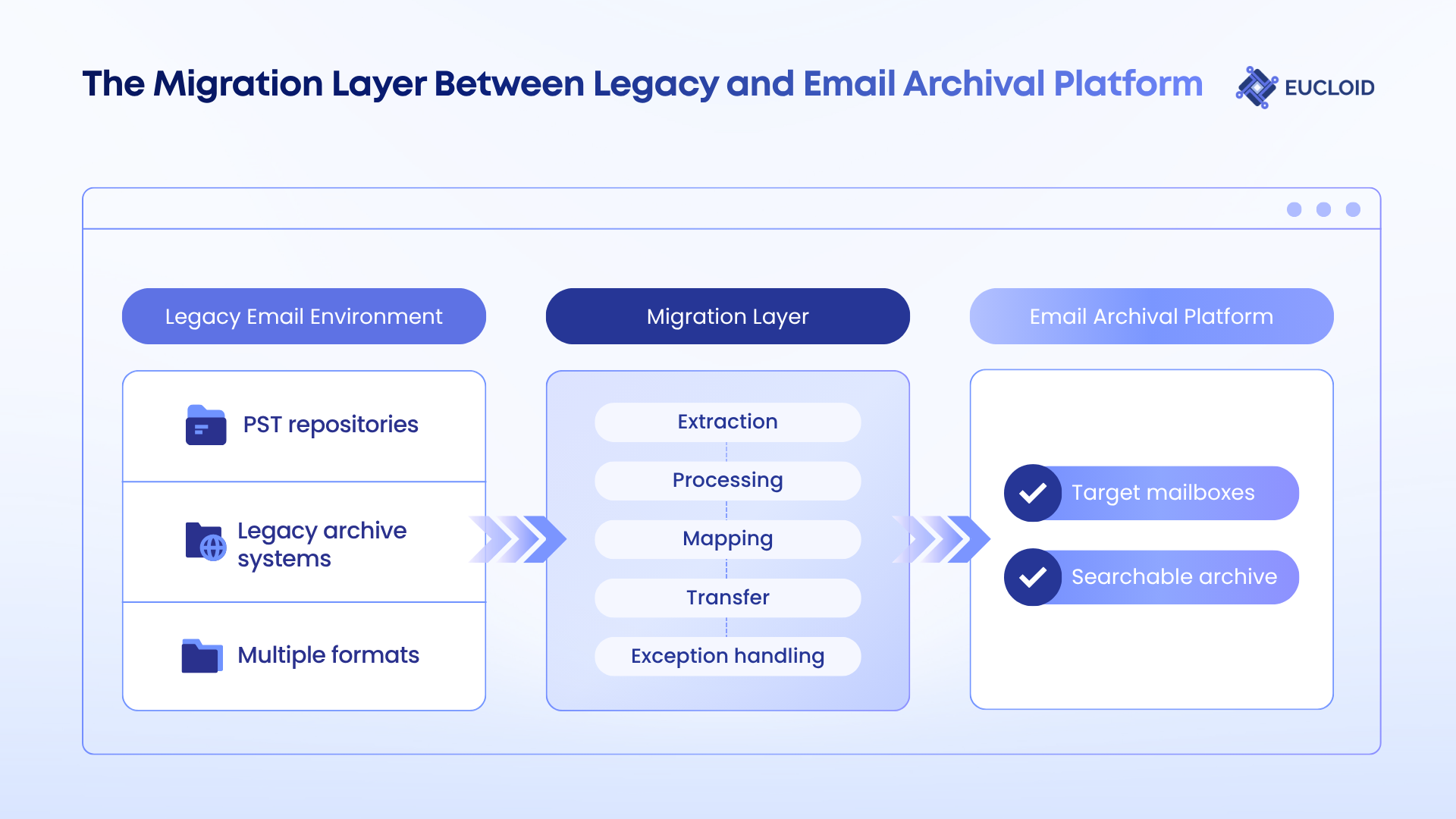
At enterprise scale, the migration layer also needs to manage batching, source-to-mailbox mapping, filtering, and failed records as data moves through the pipeline.
The final part of this layer is the handoff into the destination. Records that complete processing proceed into the target environment, while failed or skipped records need to be identified for further handling. This distinction becomes important at scale, where even a small percentage of exceptions can represent thousands of individual messages.
The migration layer therefore acts as the bridge between two different email environments, translating the structure of the source archive into a form the target platform can organize.
Archive Volume Is Only One Measure of Migration Scale
Migration throughput can vary significantly depending on the source environment, target platform, server workload, and other conditions. When multiple PSTs are mapped to different target mailboxes, imports can run in parallel; multiple PSTs going into the same mailbox are processed sequentially.
Now, especially for large email archival migrations, the workload therefore depends on how the archive is distributed across files, mailboxes, messages, and attachments, alongside the capacity available to process it.
This is one of the biggest reasons why enterprise migrations begin to diverge from straightforward PST imports.
The Message-Level Details Behind a Complete Archive
Every migrated email carries information beyond its message body. And every archived email should preserve original message metadata during PST import, including sent and received dates, recipient information, and other message properties. Attachments contained in the PST are imported with the associated message.
Duplicate handling introduces another layer. Message-level identifiers can help identify items previously imported from the same source. If the same email appears across separate PSTs, those files have different source identifiers, so the overlapping message can be imported again.
The difficult part with duplicates is knowing what you are looking at. Two copies of a message can come from different archives, different users, or different points in the email lifecycle.
-Abhishek Mukherjee | Principal Data Engineer, Eucloid Data Solutions
There are also limits on what can enter the target platform through standard migration processes. These can include individual item-size limits, folder-depth restrictions, unsupported formats, or other platform-specific constraints.
These details shape the completeness of the final archive. Migration accuracy needs to account for preserved message data as well as duplicates, unsupported items, and records that require further handling.
The Exception Queue Is Where Migration Quality Gets Tested
A migration report can show a successful import while individual records still need attention.
The question that arises here is why a record did not arrive. The fact is- different exceptions require different treatment:
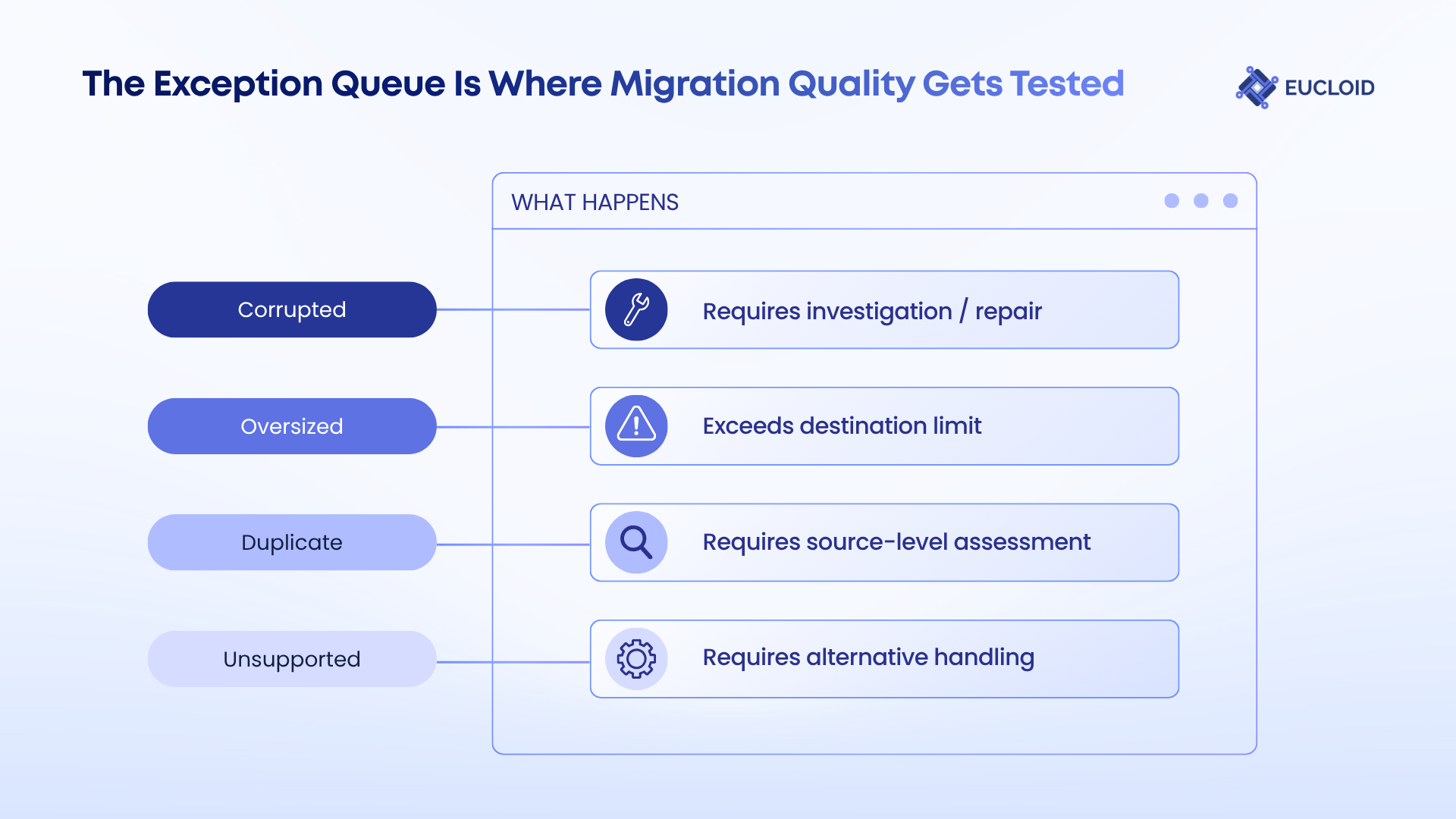
This is where enterprise migration work goes beyond counting successful imports because here, the exception queue becomes a separate dataset to analyze, track, and reconcile. Each exception needs to be classified against its source, cause, destination behavior, and potential recovery path. That gives migration teams a way to distinguish recoverable records from genuine exclusions and account for the data that does not follow the standard migration path.
The Validation Checklist for a Complete Migration
A migration can report successful imports while leaving teams with an incomplete picture of what reached the archive. Thus, import completion only provides a status that the target platform has processed the migration job. It does not, by itself, establish that the destination archive matches the source.
Validation needs to work at more than one level.
In fact, it needs to connect several layers of evidence: Source inventory: what was identified for migration
- Migration output: what entered the destination
- Message-level results: what was imported, skipped, or duplicated
- Exception records: what requires investigation or reprocessing
- Reconciliation: whether the final destination can be matched back to the source
Import reporting only provides visibility into PST files processed, target mailboxes, imported items, and corrupted items skipped during processing. However, large archival programs also need that evidence to be consolidated across 100s of terabytes, thousands of PSTs, and large mailbox populations.
For enterprise archives, a connected view is what can make it easier to track the migration from source data through to its final destination.
A Purpose-Built Platform for Enterprise Archive Migration
With the scale and variability of enterprise archive migrations, teams need a way to manage extraction, processing, migration, and reconciliation across the same program.
Enterprise Email Migrator is the platform Eucloid built for this purpose, bringing together the core migration workloads in one system, including archive extraction, data processing, validation, and reconciliation. It also supports different source formats and migration requirements across enterprise programs, with dedicated engineers handling source- and destination-specific requirements.
The platform has delivered migrations 60% faster than prior in-house approach, with 99%+ accuracy and zero data loss, through reconciliation and audit trails.
Planning an enterprise email archive migration? Talk to our experts.